
From a site image to an inspection overview
Building Wind Screening combines a desktop prototype with an approved online direct-input demo. The desktop workflow is designed for annotating groups of buildings and exploring their relative wind-pressure exposure under different wind directions. It brings image calibration, editable building footprints, floor and height information, simplified pressure estimates and visual exports into one workflow.
The project is intended to support exploratory inspection planning for residential communities, campuses and multi-building sites. It helps organize which buildings, facades and floor bands deserve closer attention under a chosen scenario.
What the current prototype does
- Loads a user-supplied site image and calibrates distances using two scale points.
- Creates and refines building footprints, including corner editing, additional vertices and rotation.
- Records building names, floors, heights and a selected target building.
- Annotates open areas and considers surrounding buildings in directional exposure estimates.
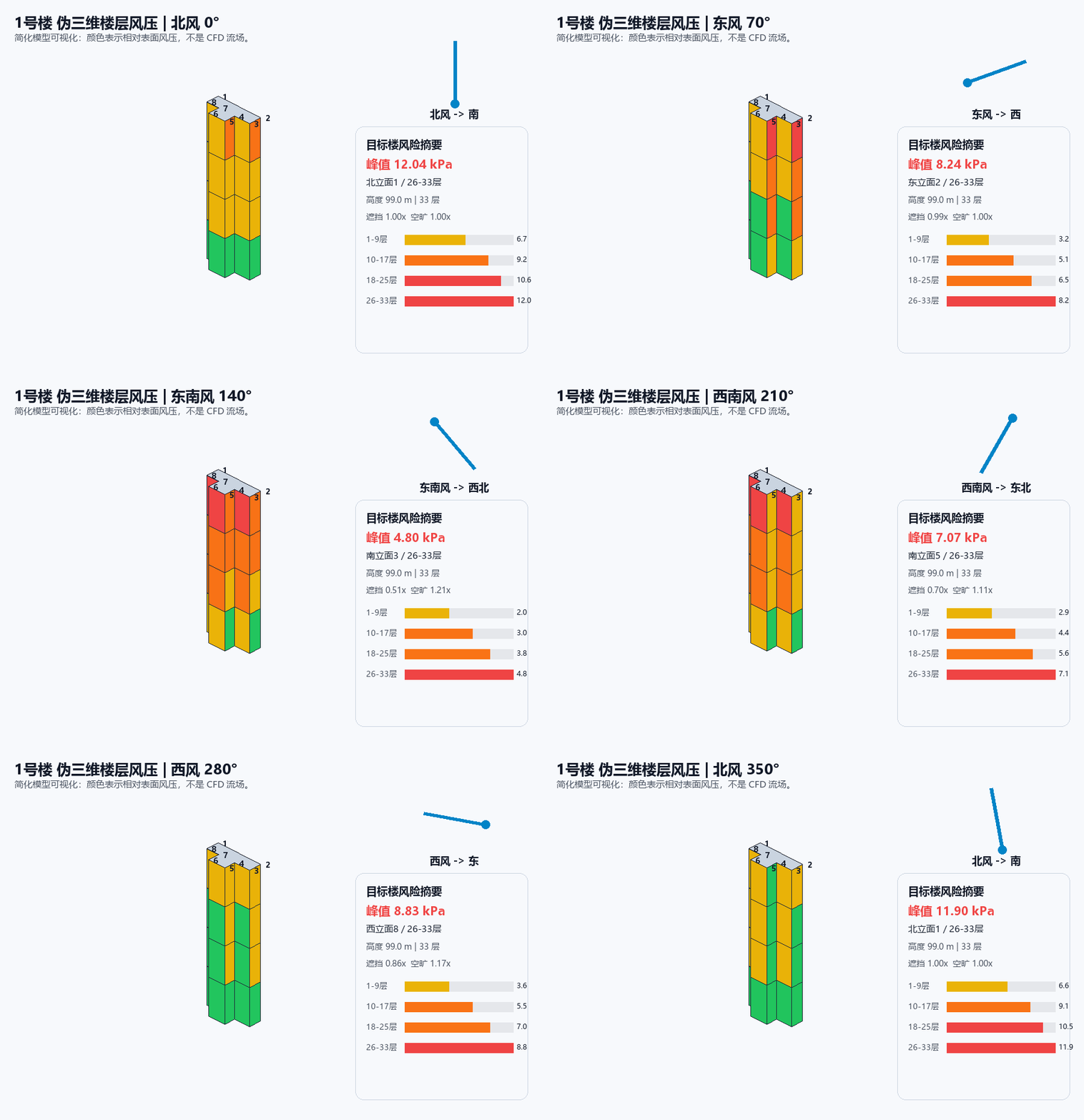
- Compares facade pressures, floor-band summaries and building-level rankings as wind direction changes.
- Saves and reloads project annotations in JSON, and exports static PNG figures and plan-view or pseudo-3D GIF animations.
Calculate directly in the browser
Use Online compute demo above, sign in with an approved account and select Wind pressure. The form does not require a site image or a JSON upload. The compute portal uses a fixed HTTPS address. New users must verify their email and obtain administrator approval.
- Click Load three-building example for a complete hypothetical scenario, or enter 1–20 rectangular buildings. Each row records a unique name, center X/Y in meters, width, depth, floors, explicit height and clockwise rotation. X is east-positive and Y north-positive; width/depth are east-west/north-south before rotation. The plan preview helps check the geometry.
- Enter a reference model-speed parameter V (0–100 m/s) and incoming direction (0° north, 90° east, 180° south, 270° west). The model does not calibrate averaging time or terrain normalization to a site wind record: an observed gust or a code-defined design speed cannot be substituted without a justified mapping.
- Optionally enter up to ten rectangular open areas in the same coordinate system. The form checks dimensions, names and footprint overlap before a task is accepted. Only the explicitly entered surroundings are considered.
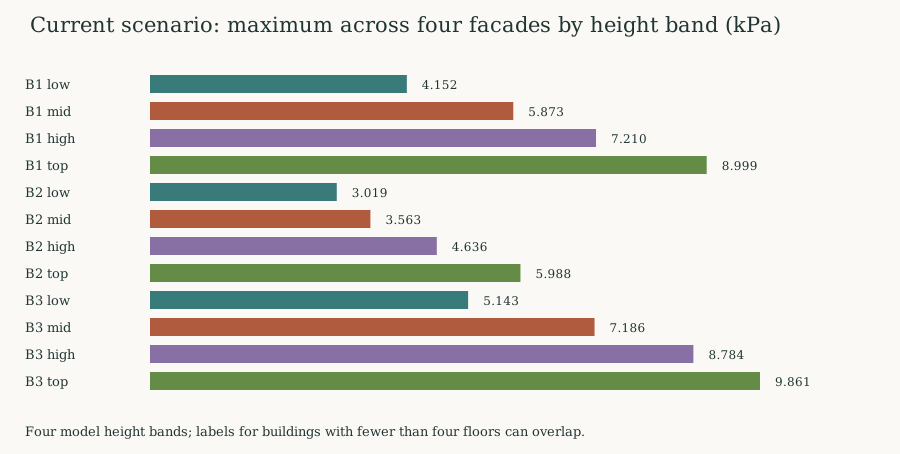
- Submit, then read the building ranking and selected building's four facades × four height bands directly on the page. Closing the page does not stop the task; View results in your task history restores the result.
- Download the ZIP with input/report JSON, building/facade/direction CSVs and three SVG plots. The direction scan samples 0–345° every 15° at fixed speed. Download within 72 hours.
Dimensions are 2–200 m for buildings, heights 3–450 m, floors 1–150 and height/floors 2.2–6 m. Open-area dimensions may reach 500 m. Positions are bounded to ±1000 m from the chosen origin. A run uses at most one CPU, 512 MiB memory and two minutes; it shares the account's one-running/two-queued/ten-daily quota with the other tools.
Method and interpretation
The server uses a headless snapshot of the original desktop calculation functions, with their mathematical definitions preserved. Basic velocity pressure is q_ref = 0.5 × 1.25 × V² / 1000 kPa. The prototype uses a clipped height/roughness and turbulence expression for qp(z), then multiplies absolute external/internal pressure-coefficient magnitudes by empirical facade, corner, height-band, shielding, shape, open-area and nearby-building factors. Reports retain model factors, representative heights, roughness and source hashes.
These are nonnegative pressure magnitudes, not signed loads, component resistance or failure probabilities. Four representative height bands are not individual-floor solutions; labels can overlap for buildings with fewer than four floors. The JRC wind-action background provides general context, not validation or standards certification of these empirical corrections.
The three-building case completed a real browser submission, server computation, in-page review and ZIP download. Download its inputs and recorded outputs. These are synthetic rectangles without any real site's geometry. The headless core matched the desktop source exactly for 30 generated scenarios / 90 buildings; this checks software equivalence, not physical accuracy.
Desktop image workflow
Start with a site image and a known reference length. Calibrate the image, outline the buildings, enter their floors or heights, and mark relevant open areas. Set a wind-speed and incoming-direction scenario, then review the building overview and the selected building’s facade and floor-band outputs.
Annotations remain in the original image-pixel coordinate system. Zooming and panning change the desktop view rather than the stored building geometry.
How to read the output
The model combines velocity pressure with height-dependent estimates, facade orientation and heuristic adjustments for building shape, surrounding exposure, shielding, open areas and nearby-building channels. Four floor bands provide a compact comparison across building height.
The pseudo-3D animation illustrates how this screening model’s surface-pressure estimates change with wind direction. Its colors describe relative modeled exposure; they are not a computed airflow field or observed damage measurements.
Scope and current limitations
This is a development-stage screening model. The pressure coefficients and environmental corrections include empirical assumptions, and the project documentation identifies a need for comparison with measurements and established engineering methods. It does not estimate glass-breakage probability or certify structural or facade safety, and it does not replace CFD, wind-tunnel testing or professional engineering assessment.
Development status and access
The reviewed working folder contains a Python/Tkinter desktop implementation, requirements and product notes, saved example projects, an earlier standalone HTML prototype and exported animations. PNG/GIF export uses Pillow. A public source release and downloadable software package have not been established for this project yet.
This page presents the direct-input online workflow and an existing desktop export. The online form currently supports rectangles; image calibration and arbitrary polygon editing remain in the desktop workflow. For a demonstration, collaboration or release enquiries, contact Yuming Su using the link above.